Why did this drill 1/4” holes when previous versions cut 1/8” holes?
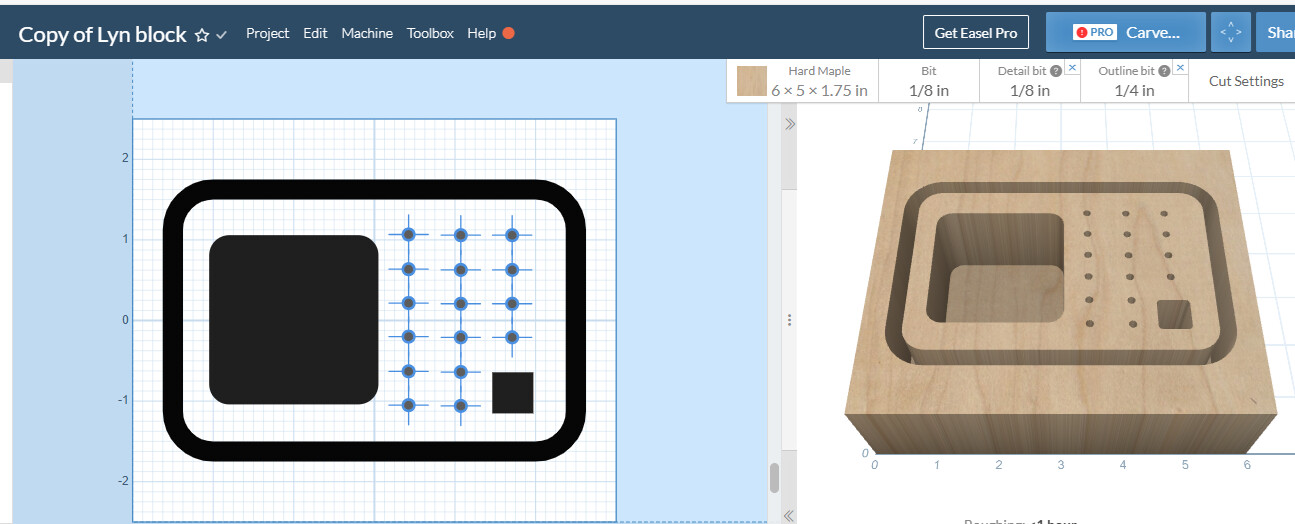
I suspect that the cut order is the problem. As I remember the drill holes is first operation but not sure as I spend more time with Easel the operation orders with become more clear.
I like to have more control of the work flow order so I limit each drawing to two cut procedures and always home in between drawings. So this part would have ideally would have 4 work pieces, one to drill holes, one to cut the pockets, one to cut the outline and a final one that shows all the work pieces to see how all the parts will interact with each other.
Having many component sheets with all the same format also allows easy alterations on standard parts.
Hoping this helps.
1 Like
Thank you, Ron.
I added a separate cut sheet for the holes, and that worked. What confuses me is that I’ve carved a few of these, and it always used the 1/8’ bit for the holes.
i’m not sure if this will help but here goes
There is a difference between a drilled hole and a bored hole. One has a circle and and the preview will show the hole as a hole and when you simulate the carve the cutter will plunge into the work piece at the set speed and feed rate with no X or Y axis movements.
The drill cursor has a big X underneath a circle and doesn’t care what the diameter drill but is used. What ever bit is in the collet easel will make a hole straight into the work with no changes to cut diameter. IF you set an 1/8” cutter and draw a 1/4” hole it will still only cut a 1/8 hole.
If you bore a hole, Easel will plunge the bit into the material and the move the bit out out from the center to achieve the desire diameter by altering the X and Y positions. If you set an 1/8” cutter and draw a 1/4” hole it will

cut a 1/4” hole.
1 Like
This topic was automatically closed 90 days after the last reply. New replies are no longer allowed.