I am trying very hard to understand “Cut Type”. First area is when you pick a stock design in Easel Pro, and you have 4 options for cut type. It doesn’t seem to mater which cut I pick, it never looks the same after it is in the drawing. I don’t understand how to choose.
Second, when you have an object in a project and you have to choose a cut type. I understand a pocket cut but I am confused on the other 3. For example, let’s say you have a 4 inch circle to cut, which cut choice will give you a true 4 inch O.D. circle after the cut is complete? Also, why does the object on the project drawing sheet look different than the preview cut on the right?
Thanks, Art
Cut type refers to the toolpath. You are on the toolpath, outside the toolpath, or inside the toolpath. You also have the option to clear out within a shape. So the toolpath is just a line and depending on your bit choice will follow the path you select. Imagine you have a 1/4" straight bit. The center of the bit will be on the cut path and remove 1/8" on both sides of the path. If you choose inside the path then the bit is offset inside by 1/8, and lastly outside the path offset by 1/8 if that choice is made.
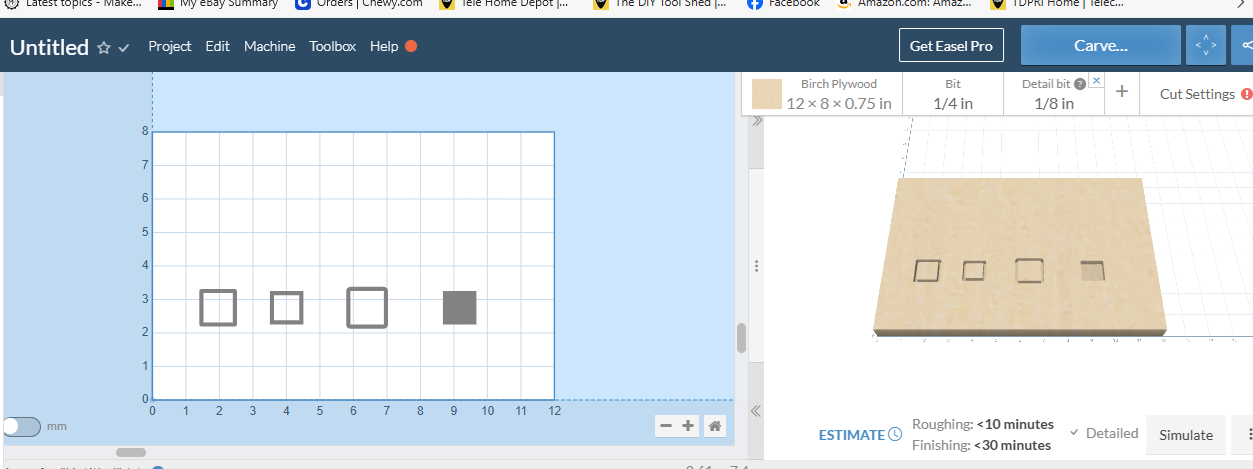
If you made a 1" square it would look like this.
Left to right On, inside, outside, and clear out:
If you change bit size, the simulated shape will change with it.
Thanks Martin. It makes more sense now that you consider bit size.
Just to expand a little - the blue line is the program path that the spindle follows. The light grey line is the path width that the cutter does. As you alter the cutter dimension a better image should form in your mind. By watching as you toggle thru the path options it should help clarify the choices. Hope this adds to what is already written.


This topic was automatically closed 90 days after the last reply. New replies are no longer allowed.